Nexconn-AI
    • Nexconn LLM API Service
    • Quick Start
    • Key Concepts and Terminology
    • Try Nexconn Large Model API Online
    • How to Get API-KEY
    • FAQ
    • Model
      • Model List
        GET
    • Chat
      • Bypass Interface
        • Bypass Anthropic Protocol
        • bypass Vertex/Gemini protocol
        • bypass Responses protocol
      • gemini-3.1-pro-preview
        • gemini-3.1-pro-preview reasoning
        • gemini-3.1-pro-preview qfile
      • gemini-2.5-pro
        • gemini-2.5-pro reasoning
      • openai/gpt-5
        • openai/gpt-5 reasoning
      • openai/gpt-5.2
        • openai/gpt-5.2 Reasoning
      • openai/gpt-5.2-codex
        • openai/gpt-5.2-codex
      • gemini-2.5-flash
        • gemini-2.5-flash Reasoning
      • claude-4.5-sonnet
        • claude-4.5-sonnet reasoning
      • claude-4.6-opus
        • claude-4.6-opus reasoning
      • deepseek/deepseek-v3.2-251201
        • deepseek/deepseek-v3.2-251201 reasoning
      • deepseek-v3
        • Chat
      • claude-3.7-sonnet
        • Chat completion
      • doubao-seed-1.6
        • doubao-seed-1.6
      • qwen3-max-2026-01-23
        • Chat completion
      • moonshotai/kimi-k2.5
        • Chat completion
      • Chat completion
        POST
      • Anthropic Protocol
        POST
    • Video
      • Veo
        • Create Video Generation Task
        • Query Video Generation Task
      • sora-2
        • Create Video Generation Task
        • Query Video Generation Status
        • Video Remix
      • sora-2-pro
        • Create Video Generation Task
        • Query Video Generation Status
        • Video Remix
      • kling-v2-1
        • Create Video Task
        • Query Video Generation Status
      • kling-v2-5-turbo
        • Create Video Task
        • Query Video Generation Status
      • kling-v2-6
        • Create Video Task
        • Query Video Generation Status
      • kling-v3
        • Create Video Task
        • Query Video Generation Status
      • kling-video-o1
        • Create Video Task
        • Query Video Generation Status
      • kling-v3-omni
        • Create Video Task
        • Query Video Generation Status
      • bytedance/doubao-seedance-2-0-260128
        • Create Video Generation Task
        • Query Video Generation Task
      • vidu
        • viduq1
          • Create text-to-video task
          • Create reference to video task - Non-subject invocation (video generation)
          • Create reference to video task - Subject invocation (supports video with audio function)
          • Query task status
          • Query task results
        • viduq2
          • Create text-to-video task
          • Create reference to video task - Non-subject invocation (video generation
          • Create reference to video task - Subject invocation (supports video with audio function)
          • Query task status
          • Query task results
        • viduq2-pro
          • Create Image-to-Video Task
          • Create First and Last Frame to Video Task
          • Create reference video generation task - non-subject invocation (video generation)
          • Query task status
          • Query task results
        • viduq2-turbo
          • Create Image-to-Video Task
          • Create First and Last Frame to Video Task
          • Query task status
          • Query task results
        • viduq3-pro
          • Create Image-to-Video Task
          • Create text-to-video task
          • Create First and Last Frame to Video Task
          • Query task status
          • Query task results
        • viduq3-turbo
          • Create Image-to-Video Task
          • Create text-to-video task
          • Create First and Last Frame to Video Task
          • Query task status
          • Query task results
    • Image Generation
      • kling-v1
        • Create text-to-image or single image-to-image task
        • Query task status
      • kling-v1-5
        • Create text-to-image or single image-to-image task
        • Query task status
      • kling-v2
        • Create text-to-image or single image-to-image task
        • Create multi-image-to-image task
        • Query task status
      • kling-v2-new
        • Create single image-to-image task
        • Query task status
      • kling-v2-1
        • Create text-to-image or single image-to-image task
        • Create multi-image-to-image task
        • Query task status
      • gemini-2.5-flash-image
        • Chat interface - supports text-to-image, image-to-image, and pure conversation
        • Text-to-image API - Generate images from text descriptions
        • Image-to-image API - Generate new images based on input images
      • gemini-3.0-pro-image-preview
        • Chat interface - supports text-to-image, image-to-image, and pure conversation
        • Text-to-image API - Generate images from text descriptions
        • Image-to-image API - Generate new images based on input images
      • gemini-3.1-flash-image-preview
        • Chat interface - supports text-to-image, image-to-image, and pure conversation
        • Text-to-image API - Generate images from text descriptions
        • Image-to-image API - Generate new images based on input images
      • kling-image-o1
        • Create image generation task
        • Query image generation task
        • Get Result
    • Files
      • Create file upload task
      • Query file status
      • List user files
    • Schemas
      • Chat
        • ChatCompletionRequest
        • ChatCompletionRequestMessage
        • ToolObject
        • ChatTemplateKwargs
        • ThinkType
        • ReasoningType
        • ImageConfig
        • SafetySetting
        • MessageContent
        • ImageUrl
        • VideoUrl
        • InputAudio
        • FileUrl
        • CacheControl
        • FunctionCall
        • ToolCall
        • ToolCallFunction
        • Image
        • ThinkingBlock
        • ToolFunction
        • ToolParameters
      • Video
        • kling-v2-1
          • KlingV21CreateRequest
          • KlingV21CreateResponse
          • KlingV21StatusResponse
        • kling-v2-5-turbo
          • KlingV25TurboCreateRequest
          • KlingV25TurboCreateResponse
          • KlingV25TurboStatusResponse
        • kling-video-o1
          • KlingVideoO1CreateRequest
          • KlingVideoO1CreateResponse
          • KlingVideoO1StatusResponse
        • kling-v3-omni
          • KlingV3OmniCreateRequest
        • kling-v3
          • KlingV3CreateRequest
        • kling-v2-6
          • KlingV26CreateRequest
          • KlingV26CreateResponse
          • KlingV26VideoStatusResponse
        • Veo
          • CreateVideoGenerationRequest
          • CreateVideoGenerationResponse
          • VideoGenerationJobInfo
          • ErrorResponse
          • Instance
          • ImageInput
          • LastFrameInput
          • VideoInput
          • ReferenceImage
          • Parameters
          • VideoGenerationData
          • VideoResult
        • VideoCreateResponse
      • Image Generation
        • kling-v1
          • KlingV1CreateImageRequest
        • kling-v1-5
          • KlingV15CreateImageRequest
        • kling-v2
          • KlingV2CreateImageRequest
          • KlingV2EditImageRequest
        • kling-v2-new
          • KlingV2NewCreateImageRequest
        • kling-v2-1
          • KlingV21CreateImageRequest
          • KlingV21EditImageRequest
        • gemini-2.5-flash-image
          • Gemini25FlashImageChatCompletionRequest
          • Gemini25FlashImageGenerationRequest
          • Gemini25FlashImageEditRequest
          • Gemini25FlashImageConfig
        • gemini-3.0-pro-image-preview
          • Gemini30ProImageChatCompletionRequest
          • Gemini30ProImageGenerationRequest
          • Gemini30ProImageEditRequest
          • Gemini30ProImageConfig
        • KlingImageTaskResponse
        • KlingImageTaskStatusResponse
        • ChatCompletionResponse
        • ImageGenerationResponse
        • FalOmniImageRequest
        • Gemini31FlashImageChatCompletionRequest
        • Gemini31FlashImageGenerationRequest
        • Gemini31FlashImageEditRequest
        • ChatMessage
        • Gemini31FlashImageConfig
      • CreateFileRequest
      • QueueStatus
      • ContentItem
      • FileResponse
      • Veo31FirstLastFrameToVideoInput
      • ToolItem
      • CreateVideoTaskResponse
      • FileListResponse
      • ApiErrorBody
      • FileDeleteResponse
      • GetVideoTaskResponse
      • Veo31ImageToVideoInput
      • Veo31ImageToVideoOutput
      • ChatCompletionResponse
      • FileError
      • ImageGenerationResponse
      • ErrorResponse
      • KodoSource
      • File
      • ImageUrlObject
      • VideoUrlObject
      • AudioUrlObject
      • DraftTaskObject
      • ChatMessage
      • VideoTaskOutputContent
      • VideoTaskToolUsageItem
      • VideoTaskUsage

    Nexconn LLM API Service

    ๐Ÿš€

    All-in-One AI Intelligence Service Platform#

    Integrating world-class AI large models to empower your business with artificial intelligence

    What is Nexconn LLM API Service?#

    Nexconn LLM API Service is a ready-to-use artificial intelligence platform that provides access to 70+ world-leading AI large models.
    ๐Ÿ’ก
    Simply put: It's like an "AI supermarket" where you can use various advanced artificial intelligence models without building and maintaining complex AI systems yourself.

    Core Advantages#

    ๐ŸŒŸ Rich Model Selection#

    Excellent Domestic Models#

    Kimi (Moonshot AI)
    DeepSeek
    Qwen (Tongyi Qianwen)
    Doubao
    GLM (Zhipu AI)
    Minimax M2

    Top International Models#

    Open-source MoE models

    โšก Simple and Easy to Use#

    No complex configuration: All models are compatible with OpenAI API and Anthropic API, ready to call directly
    Multiple integration methods: REST API, SDK, online console to meet different needs

    ๐Ÿ”’ Secure and Reliable#

    CHECK
    โœ“ End-to-end encrypted transmission
    โœ“ Does not store your sensitive data
    โœ“ Complete access logs and audit functionality
    โœ“ HTTPS encryption for all API calls

    ๐Ÿ’ฐ Flexible Billing#

    Pay-as-you-go: Charged based on actual Token usage
    Resource package discounts: Multiple packages available with greater discounts
    TIP
    Daily spending is capped at $100 per account. Upon reaching this limit, LLM API services will be automatically suspended. To resume service or pre-authorize a higher limit, please contact your sales representative.

    Application Scenarios#

    Nexconn LLM API Service can be applied to multiple domains, creating value for your business:
    Scenario ModuleScenario Description
    ๐Ÿ’ป Code AssistantCode generation, debugging, optimization, code review
    ๐Ÿ“š Technical Documentation GenerationAutomatically generate API documentation, technical specifications
    ๐Ÿ” Intelligent Search EngineAdd intelligent search functionality to websites or applications
    โœ๏ธ Content CreationCopywriting, creative design, marketing planning
    ๐ŸŽฌ Short Video ProductionScript generation, subtitle translation, content optimization
    ๐ŸŽ™๏ธ Virtual AnchorAI-driven virtual avatars and voice broadcasting
    โš–๏ธ Legal Document AssistantContract drafting, legal consultation, document review
    ๐Ÿฅ Medical ConsultationPreliminary symptom analysis, health advice (auxiliary reference)
    ๐Ÿ’ฐ Financial AdvisorInvestment advice, financial analysis, market research
    ๐ŸŽฎ Game NPCIntelligent game characters, level generation, game coaching
    ๐Ÿ’ฌ Companion AssistantEmotional companionship, chat interaction, psychological counseling
    ๐Ÿ‘จโ€๐Ÿ‘ฉโ€๐Ÿ‘งโ€๐Ÿ‘ฆ Family AdvisorParenting advice, cooking guidance, life tips

    Pricing Plans#

    Pay-as-you-go#

    Charged based on actual Token usage, billed at the beginning of each month
    โœ“ No prepayment required
    โœ“ Pay only for what you use
    โœ“ Controllable costs

    How to Get Started?#

    Step 1: Register an Account#

    Visit Nexconn Console to register and log in to your account.

    Step 2: Add Your Credit Card#

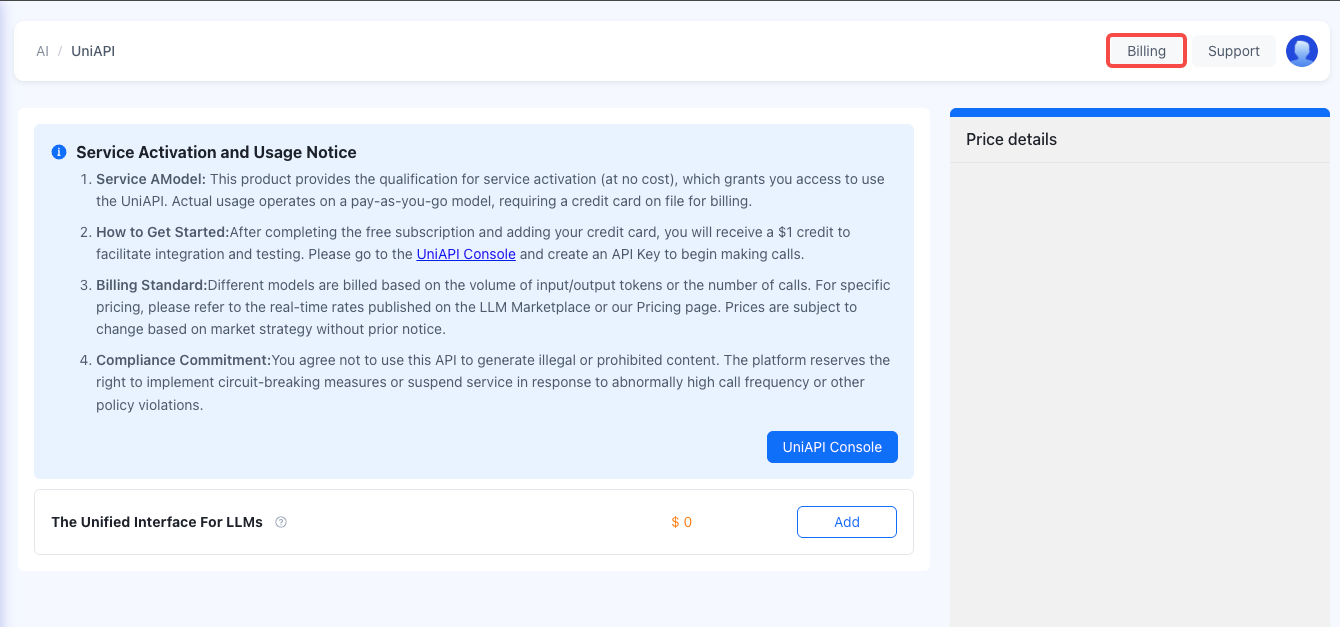
    Add your credit card by clicking the Billing button in the Console.
    add your credit card

    Step 3: Purchase Service#

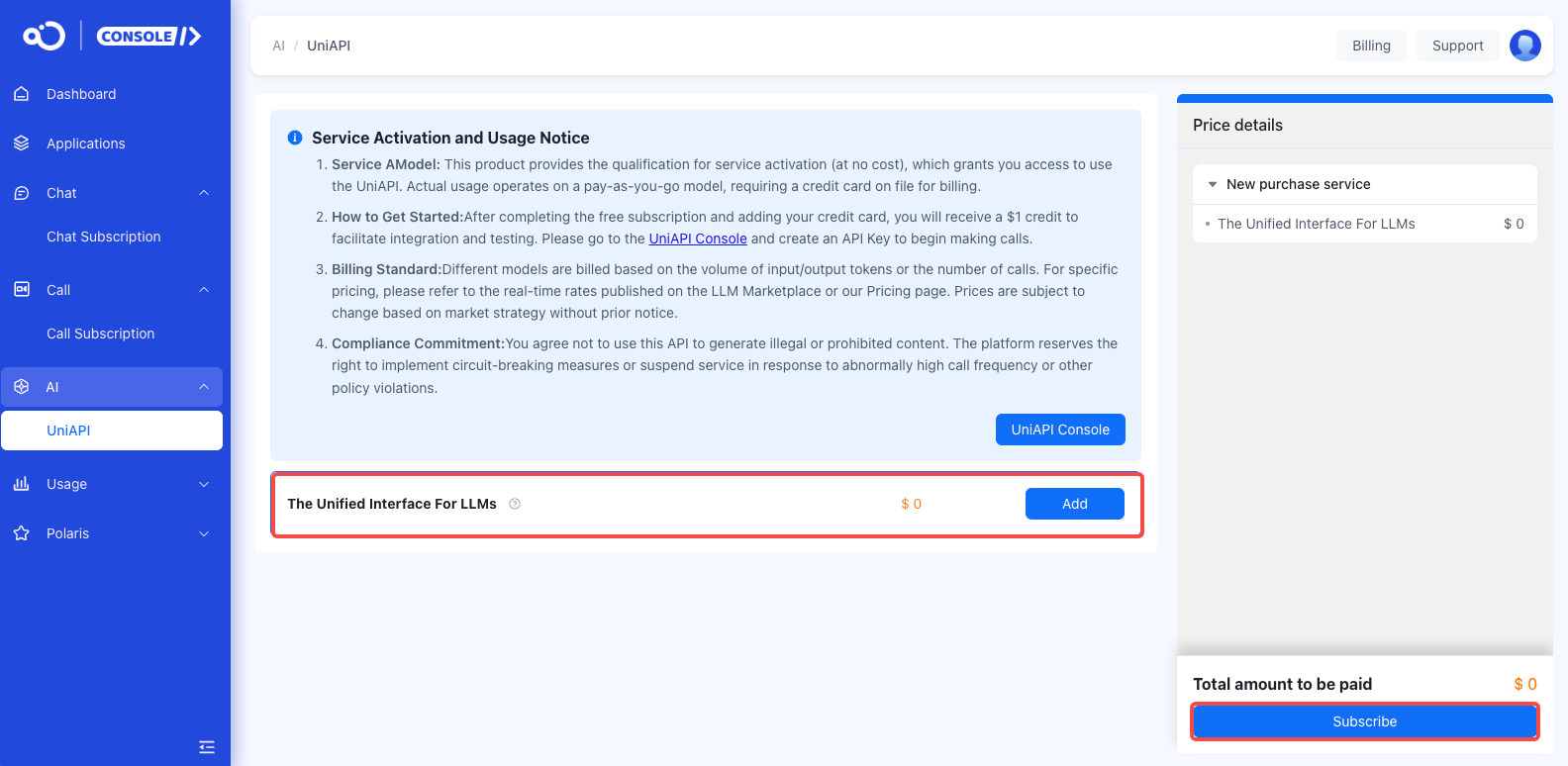
    In the developer backend, select UniAPI > Subscribe to activate the LLM API service.
    purchase service
    WARNING
    โš ๏ธ Real-name Verification Notice: Real-name verification is required before purchase

    Step 4: Get API Key#

    Go to LLM API Console to create an API Key for calling AI services. See How to Get API-KEY for details.
    WARNING
    โš ๏ธ Please keep your API Key safe and do not disclose it to others.

    Step 5: Choose Integration Method#

    Select the appropriate integration method based on your needs:
    Online Chat: Use directly on the web without programming
    API Calls: Integrate into your application through code
    SDK: Use officially provided development kits

    Step 6: Start Using#

    Refer to documentation examples and make your first AI call!

    Technical Support#

    INFO
    We provide comprehensive technical support to ensure your user experience. You can submit a ticket to contact us.

    Summary#

    Why Choose Nexconn LLM API?#

    โœ“ Rich Models: One-stop access to 70+ world-leading models
    โœ“ Simple and Easy: Compatible with mainstream APIs, quick integration
    โœ“ Secure and Reliable: Enterprise-grade data security protection
    โœ“ Flexible Billing: Multiple plans to meet different needs
    โœ“ Powerful Features: Advanced features like MCP, Agent, internet access
    โœ“ Professional Support: Comprehensive technical service guarantee
    ๐ŸŽฏ
    Start your AI journey now and empower your business with artificial intelligence!

    Register Now โ†’
    Modified atย 2026-04-30 07:57:20
    Next
    Quick Start
    Built with