Copy Page
Nexconn-AI
Nexconn LLM API Service
Quick Start
Key Concepts and Terminology
Try Nexconn Large Model API Online
How to Get API-KEY
FAQ
Model
Model List
GET
Chat
Bypass Interface
Bypass Anthropic Protocol
bypass Vertex/Gemini protocol
bypass Responses protocol
gemini-3.1-pro-preview
gemini-3.1-pro-preview reasoning
gemini-3.1-pro-preview qfile
gemini-2.5-pro
gemini-2.5-pro reasoning
openai/gpt-5
openai/gpt-5 reasoning
openai/gpt-5.2
openai/gpt-5.2 Reasoning
openai/gpt-5.2-codex
gemini-2.5-flash
gemini-2.5-flash Reasoning
claude-4.5-sonnet
claude-4.5-sonnet reasoning
claude-4.6-opus
claude-4.6-opus reasoning
deepseek/deepseek-v3.2-251201
deepseek/deepseek-v3.2-251201 reasoning
deepseek-v3
Chat
claude-3.7-sonnet
Chat completion
doubao-seed-1.6
doubao-seed-1.6
qwen3-max-2026-01-23
Chat completion
moonshotai/kimi-k2.5
Chat completion
Chat completion
POST
Anthropic Protocol
POST
Video
Veo
Create Video Generation Task
Query Video Generation Task
sora-2
Create Video Generation Task
Query Video Generation Status
Video Remix
sora-2-pro
Create Video Generation Task
Query Video Generation Status
Video Remix
kling-v2-1
Create Video Task
Query Video Generation Status
kling-v2-5-turbo
Create Video Task
Query Video Generation Status
kling-v2-6
Create Video Task
Query Video Generation Status
kling-v3
Create Video Task
Query Video Generation Status
kling-video-o1
Create Video Task
Query Video Generation Status
kling-v3-omni
Create Video Task
Query Video Generation Status
bytedance/doubao-seedance-2-0-260128
Create Video Generation Task
Query Video Generation Task
vidu
viduq1
Create text-to-video task
Create reference to video task - Non-subject invocation (video generation)
Create reference to video task - Subject invocation (supports video with audio function)
Query task status
Query task results
viduq2
Create text-to-video task
Create reference to video task - Non-subject invocation (video generation
Create reference to video task - Subject invocation (supports video with audio function)
Query task status
Query task results
viduq2-pro
Create Image-to-Video Task
Create First and Last Frame to Video Task
Create reference video generation task - non-subject invocation (video generation)
Query task status
Query task results
viduq2-turbo
Create Image-to-Video Task
Create First and Last Frame to Video Task
Query task status
Query task results
viduq3-pro
Create Image-to-Video Task
Create text-to-video task
Create First and Last Frame to Video Task
Query task status
Query task results
viduq3-turbo
Create Image-to-Video Task
Create text-to-video task
Create First and Last Frame to Video Task
Query task status
Query task results
Image Generation
kling-v1
Create text-to-image or single image-to-image task
Query task status
kling-v1-5
Create text-to-image or single image-to-image task
Query task status
kling-v2
Create text-to-image or single image-to-image task
Create multi-image-to-image task
Query task status
kling-v2-new
Create single image-to-image task
Query task status
kling-v2-1
Create text-to-image or single image-to-image task
Create multi-image-to-image task
Query task status
gemini-2.5-flash-image
Chat interface - supports text-to-image, image-to-image, and pure conversation
Text-to-image API - Generate images from text descriptions
Image-to-image API - Generate new images based on input images
gemini-3.0-pro-image-preview
Chat interface - supports text-to-image, image-to-image, and pure conversation
Text-to-image API - Generate images from text descriptions
Image-to-image API - Generate new images based on input images
gemini-3.1-flash-image-preview
Chat interface - supports text-to-image, image-to-image, and pure conversation
Text-to-image API - Generate images from text descriptions
Image-to-image API - Generate new images based on input images
kling-image-o1
Create image generation task
Query image generation task
Get Result
Files
Create file upload task
Query file status
List user files
Schemas
Chat
ChatCompletionRequest
ChatCompletionRequestMessage
ToolObject
ChatTemplateKwargs
ThinkType
ReasoningType
ImageConfig
SafetySetting
MessageContent
ImageUrl
VideoUrl
InputAudio
FileUrl
CacheControl
FunctionCall
ToolCall
ToolCallFunction
Image
ThinkingBlock
ToolFunction
ToolParameters
Video
kling-v2-1
KlingV21CreateRequest
KlingV21CreateResponse
KlingV21StatusResponse
kling-v2-5-turbo
KlingV25TurboCreateRequest
KlingV25TurboCreateResponse
KlingV25TurboStatusResponse
kling-video-o1
KlingVideoO1CreateRequest
KlingVideoO1CreateResponse
KlingVideoO1StatusResponse
kling-v3-omni
KlingV3OmniCreateRequest
kling-v3
KlingV3CreateRequest
kling-v2-6
KlingV26CreateRequest
KlingV26CreateResponse
KlingV26VideoStatusResponse
Veo
CreateVideoGenerationRequest
CreateVideoGenerationResponse
VideoGenerationJobInfo
ErrorResponse
Instance
ImageInput
LastFrameInput
VideoInput
ReferenceImage
Parameters
VideoGenerationData
VideoResult
VideoCreateResponse
Image Generation
kling-v1
KlingV1CreateImageRequest
kling-v1-5
KlingV15CreateImageRequest
kling-v2
KlingV2CreateImageRequest
KlingV2EditImageRequest
kling-v2-new
KlingV2NewCreateImageRequest
kling-v2-1
KlingV21CreateImageRequest
KlingV21EditImageRequest
gemini-2.5-flash-image
Gemini25FlashImageChatCompletionRequest
Gemini25FlashImageGenerationRequest
Gemini25FlashImageEditRequest
Gemini25FlashImageConfig
gemini-3.0-pro-image-preview
Gemini30ProImageChatCompletionRequest
Gemini30ProImageGenerationRequest
Gemini30ProImageEditRequest
Gemini30ProImageConfig
KlingImageTaskResponse
KlingImageTaskStatusResponse
ChatCompletionResponse
ImageGenerationResponse
FalOmniImageRequest
Gemini31FlashImageChatCompletionRequest
Gemini31FlashImageGenerationRequest
Gemini31FlashImageEditRequest
ChatMessage
Gemini31FlashImageConfig
CreateFileRequest
QueueStatus
ContentItem
FileResponse
Veo31FirstLastFrameToVideoInput
ToolItem
CreateVideoTaskResponse
FileListResponse
ApiErrorBody
FileDeleteResponse
GetVideoTaskResponse
Veo31ImageToVideoInput
Veo31ImageToVideoOutput
ChatCompletionResponse
FileError
ImageGenerationResponse
ErrorResponse
KodoSource
File
ImageUrlObject
VideoUrlObject
AudioUrlObject
DraftTaskObject
ChatMessage
VideoTaskOutputContent
VideoTaskToolUsageItem
VideoTaskUsage
How to Get API-KEY
Copy Page
How to Obtain an API Key?
#
Nexconn AI Model API service provides two methods to obtain an API Key:
Method 1: Through Nexconn Developer Console
#
Step 1: Register and Log In
Visit the
Nexconn Developer Console
.
Complete registration and real-name verification.
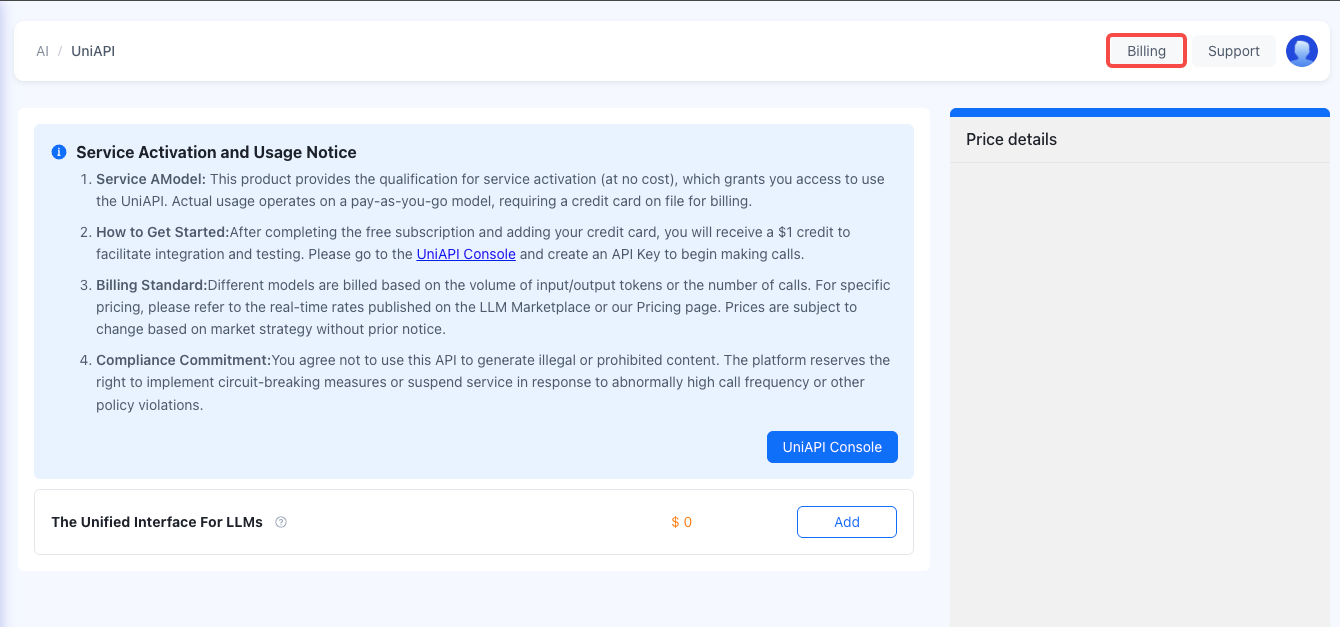
Step 2: Add Your Credit Card
Add your credit card by clicking the
Billing
button in the Console.
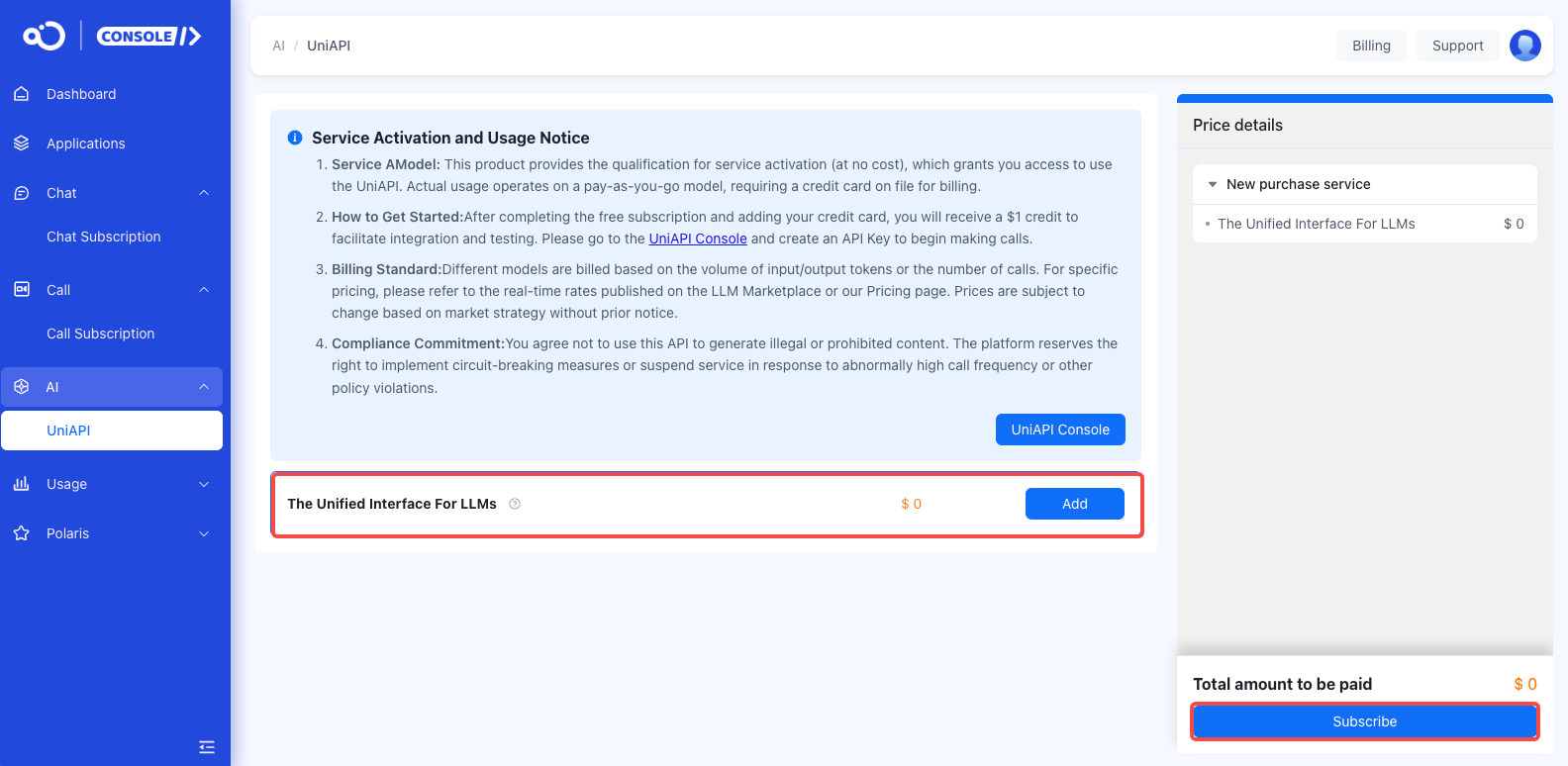
Step 3: Purchase AI Model Service
After logging in, select
The Unified Interface For LLMs
>
Subscribe
from the left menu.
Click
Purchase Now
to activate the service.
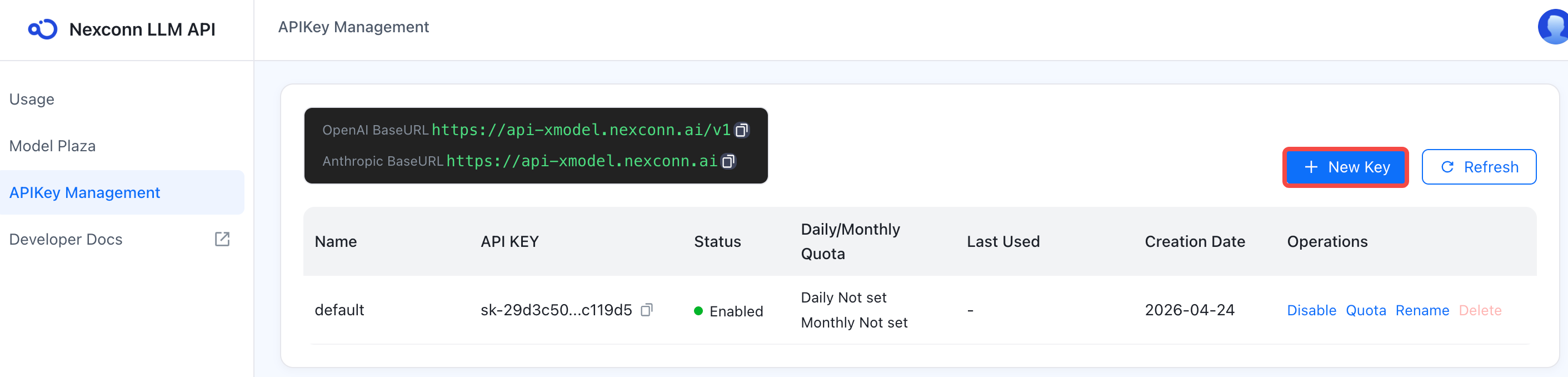
Step 4: Create an API Key
Visit the
API Key Management page in the AI Model API Console
.
Click
New Key
.
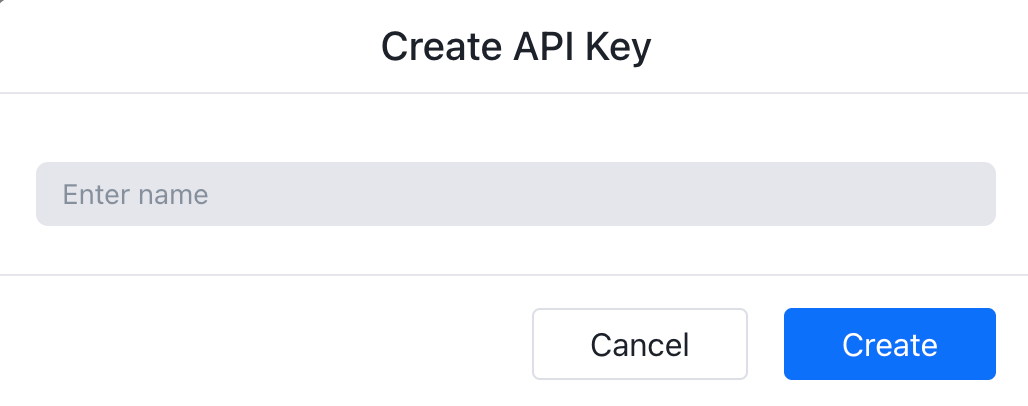
Enter a Key name (recommended to describe its purpose, such as "Production Environment", "Test Environment", etc.).
Click
Confirm
to complete creation.
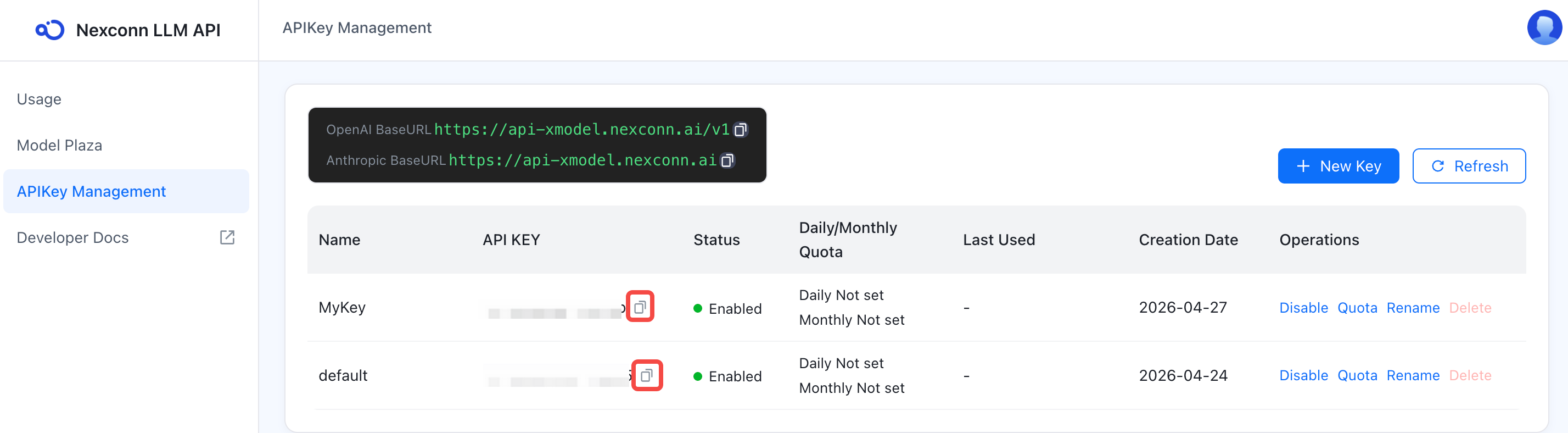
Step 5: Copy the API Key
After successful creation, locate your API Key in the list.
Click the
Copy
button and save it in a secure location.
WARNING
⚠️
Security Notice
The API Key is displayed in full only once during creation. Please keep it safe.
Do not upload your API Key to public code repositories.
If your Key is compromised, immediately disable or delete it in the console.
Method 2: Direct Access to AI Model Console
#
If you have already completed registration and purchase, you can directly visit the
Nexconn AI Model API Console
.
1.
Log in with your Nexconn account.
2.
Go to the
API Key Management
page.
3.
Click
New Key
.
4.
Fill in the name and confirm.
5.
Copy and save the API Key.
API Key Management Features
#
On the
API Key Management page
, you can:
View Key Information
#
API Key name
API Key value (partially hidden)
Status (enabled/disabled)
Daily quota
Monthly quota
Last used time
Creation time
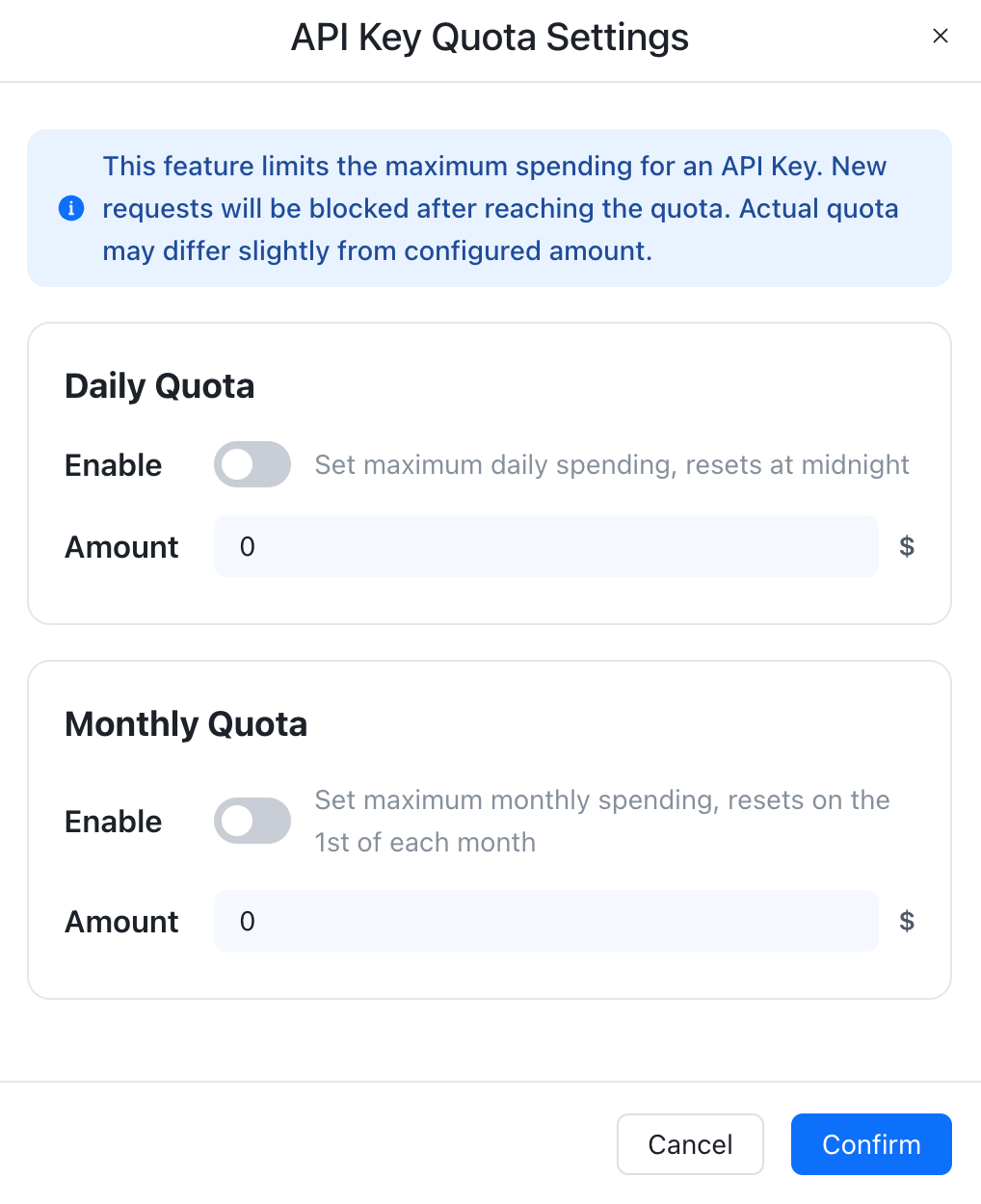
Configure Quotas
#
Set daily and monthly quotas for each Key individually to prevent overspending:
Daily Quota Settings
Quota amount: Enter the maximum daily spending amount.
API calls for this Key will automatically stop when the quota is reached.
Automatically resets at midnight each day.
Monthly Quota Settings
Quota amount: Enter the maximum monthly spending amount.
API calls for this Key will automatically stop when the quota is reached.
Calculated by calendar month (resets on the 1st of each month).
Edit Key
#
Modify Key name.
Adjust quota settings.
Enable/disable Key.
Delete Key
#
Keys that are no longer in use can be deleted.
Deletion is irreversible, please proceed with caution.
API Endpoint
#
After creating an API Key, you need to use the following endpoint to call the service:
API Base URL
https://api-xmodel.nexconn.ai/v1
Code configuration example:
FAQ
#
1. Can I create multiple API Keys?
#
Yes. It is recommended to create separate Keys for different projects or environments for easier management and usage tracking.
2. Do API Keys have an expiration date?
#
No. API Keys remain valid indefinitely unless manually deleted or disabled.
3. What if I forgot to save my API Key?
#
The Key is displayed in full only once after creation. If you forgot to save it, it is recommended to delete that Key and create a new one.
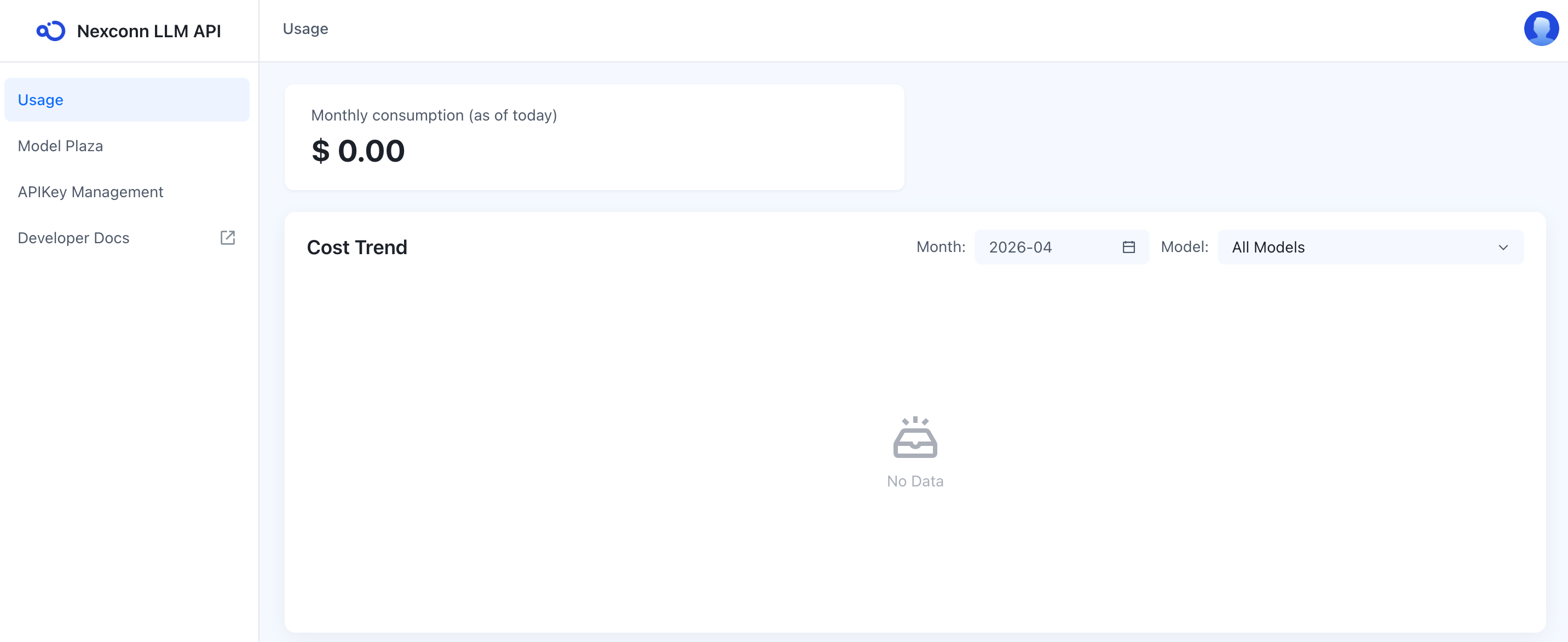
4. How can I view detailed usage for a specific Key?
#
On the
Usage
page in the console, you can filter by API Key to view detailed call records and costs.
5. What happens when a Key reaches its quota?
#
API calls will return a
402 Payment Required
or
429 Too Many Requests
error. You can:
Increase the quota configuration
Manually remove the quota limit
Wait for the quota cycle to reset (next day or next month)
Modified at
2026-05-06 02:37:08
Previous
Try Nexconn Large Model API Online
Next
FAQ