Nexconn-AI
    • Nexconn LLM API Service
    • Quick Start
    • Key Concepts and Terminology
    • Try Nexconn Large Model API Online
    • How to Get API-KEY
    • FAQ
    • Model
      • Model List
        GET
    • Chat
      • Bypass Interface
        • Bypass Anthropic Protocol
        • bypass Vertex/Gemini protocol
        • bypass Responses protocol
      • gemini-3.1-pro-preview
        • gemini-3.1-pro-preview reasoning
        • gemini-3.1-pro-preview qfile
      • gemini-2.5-pro
        • gemini-2.5-pro reasoning
      • openai/gpt-5
        • openai/gpt-5 reasoning
      • openai/gpt-5.2
        • openai/gpt-5.2 Reasoning
      • openai/gpt-5.2-codex
        • openai/gpt-5.2-codex
      • gemini-2.5-flash
        • gemini-2.5-flash Reasoning
      • claude-4.5-sonnet
        • claude-4.5-sonnet reasoning
      • claude-4.6-opus
        • claude-4.6-opus reasoning
      • deepseek/deepseek-v3.2-251201
        • deepseek/deepseek-v3.2-251201 reasoning
      • deepseek-v3
        • Chat
      • claude-3.7-sonnet
        • Chat completion
      • doubao-seed-1.6
        • doubao-seed-1.6
      • qwen3-max-2026-01-23
        • Chat completion
      • moonshotai/kimi-k2.5
        • Chat completion
      • Chat completion
        POST
      • Anthropic Protocol
        POST
    • Video
      • Veo
        • Create Video Generation Task
        • Query Video Generation Task
      • sora-2
        • Create Video Generation Task
        • Query Video Generation Status
        • Video Remix
      • sora-2-pro
        • Create Video Generation Task
        • Query Video Generation Status
        • Video Remix
      • kling-v2-1
        • Create Video Task
        • Query Video Generation Status
      • kling-v2-5-turbo
        • Create Video Task
        • Query Video Generation Status
      • kling-v2-6
        • Create Video Task
        • Query Video Generation Status
      • kling-v3
        • Create Video Task
        • Query Video Generation Status
      • kling-video-o1
        • Create Video Task
        • Query Video Generation Status
      • kling-v3-omni
        • Create Video Task
        • Query Video Generation Status
      • bytedance/doubao-seedance-2-0-260128
        • Create Video Generation Task
        • Query Video Generation Task
      • vidu
        • viduq1
          • Create text-to-video task
          • Create reference to video task - Non-subject invocation (video generation)
          • Create reference to video task - Subject invocation (supports video with audio function)
          • Query task status
          • Query task results
        • viduq2
          • Create text-to-video task
          • Create reference to video task - Non-subject invocation (video generation
          • Create reference to video task - Subject invocation (supports video with audio function)
          • Query task status
          • Query task results
        • viduq2-pro
          • Create Image-to-Video Task
          • Create First and Last Frame to Video Task
          • Create reference video generation task - non-subject invocation (video generation)
          • Query task status
          • Query task results
        • viduq2-turbo
          • Create Image-to-Video Task
          • Create First and Last Frame to Video Task
          • Query task status
          • Query task results
        • viduq3-pro
          • Create Image-to-Video Task
          • Create text-to-video task
          • Create First and Last Frame to Video Task
          • Query task status
          • Query task results
        • viduq3-turbo
          • Create Image-to-Video Task
          • Create text-to-video task
          • Create First and Last Frame to Video Task
          • Query task status
          • Query task results
    • Image Generation
      • kling-v1
        • Create text-to-image or single image-to-image task
        • Query task status
      • kling-v1-5
        • Create text-to-image or single image-to-image task
        • Query task status
      • kling-v2
        • Create text-to-image or single image-to-image task
        • Create multi-image-to-image task
        • Query task status
      • kling-v2-new
        • Create single image-to-image task
        • Query task status
      • kling-v2-1
        • Create text-to-image or single image-to-image task
        • Create multi-image-to-image task
        • Query task status
      • gemini-2.5-flash-image
        • Chat interface - supports text-to-image, image-to-image, and pure conversation
        • Text-to-image API - Generate images from text descriptions
        • Image-to-image API - Generate new images based on input images
      • gemini-3.0-pro-image-preview
        • Chat interface - supports text-to-image, image-to-image, and pure conversation
        • Text-to-image API - Generate images from text descriptions
        • Image-to-image API - Generate new images based on input images
      • gemini-3.1-flash-image-preview
        • Chat interface - supports text-to-image, image-to-image, and pure conversation
        • Text-to-image API - Generate images from text descriptions
        • Image-to-image API - Generate new images based on input images
      • kling-image-o1
        • Create image generation task
        • Query image generation task
        • Get Result
    • Files
      • Create file upload task
      • Query file status
      • List user files
    • Schemas
      • Chat
        • ChatCompletionRequest
        • ChatCompletionRequestMessage
        • ToolObject
        • ChatTemplateKwargs
        • ThinkType
        • ReasoningType
        • ImageConfig
        • SafetySetting
        • MessageContent
        • ImageUrl
        • VideoUrl
        • InputAudio
        • FileUrl
        • CacheControl
        • FunctionCall
        • ToolCall
        • ToolCallFunction
        • Image
        • ThinkingBlock
        • ToolFunction
        • ToolParameters
      • Video
        • kling-v2-1
          • KlingV21CreateRequest
          • KlingV21CreateResponse
          • KlingV21StatusResponse
        • kling-v2-5-turbo
          • KlingV25TurboCreateRequest
          • KlingV25TurboCreateResponse
          • KlingV25TurboStatusResponse
        • kling-video-o1
          • KlingVideoO1CreateRequest
          • KlingVideoO1CreateResponse
          • KlingVideoO1StatusResponse
        • kling-v3-omni
          • KlingV3OmniCreateRequest
        • kling-v3
          • KlingV3CreateRequest
        • kling-v2-6
          • KlingV26CreateRequest
          • KlingV26CreateResponse
          • KlingV26VideoStatusResponse
        • Veo
          • CreateVideoGenerationRequest
          • CreateVideoGenerationResponse
          • VideoGenerationJobInfo
          • ErrorResponse
          • Instance
          • ImageInput
          • LastFrameInput
          • VideoInput
          • ReferenceImage
          • Parameters
          • VideoGenerationData
          • VideoResult
        • VideoCreateResponse
      • Image Generation
        • kling-v1
          • KlingV1CreateImageRequest
        • kling-v1-5
          • KlingV15CreateImageRequest
        • kling-v2
          • KlingV2CreateImageRequest
          • KlingV2EditImageRequest
        • kling-v2-new
          • KlingV2NewCreateImageRequest
        • kling-v2-1
          • KlingV21CreateImageRequest
          • KlingV21EditImageRequest
        • gemini-2.5-flash-image
          • Gemini25FlashImageChatCompletionRequest
          • Gemini25FlashImageGenerationRequest
          • Gemini25FlashImageEditRequest
          • Gemini25FlashImageConfig
        • gemini-3.0-pro-image-preview
          • Gemini30ProImageChatCompletionRequest
          • Gemini30ProImageGenerationRequest
          • Gemini30ProImageEditRequest
          • Gemini30ProImageConfig
        • KlingImageTaskResponse
        • KlingImageTaskStatusResponse
        • ChatCompletionResponse
        • ImageGenerationResponse
        • FalOmniImageRequest
        • Gemini31FlashImageChatCompletionRequest
        • Gemini31FlashImageGenerationRequest
        • Gemini31FlashImageEditRequest
        • ChatMessage
        • Gemini31FlashImageConfig
      • CreateFileRequest
      • QueueStatus
      • ContentItem
      • FileResponse
      • Veo31FirstLastFrameToVideoInput
      • ToolItem
      • CreateVideoTaskResponse
      • FileListResponse
      • ApiErrorBody
      • FileDeleteResponse
      • GetVideoTaskResponse
      • Veo31ImageToVideoInput
      • Veo31ImageToVideoOutput
      • ChatCompletionResponse
      • FileError
      • ImageGenerationResponse
      • ErrorResponse
      • KodoSource
      • File
      • ImageUrlObject
      • VideoUrlObject
      • AudioUrlObject
      • DraftTaskObject
      • ChatMessage
      • VideoTaskOutputContent
      • VideoTaskToolUsageItem
      • VideoTaskUsage

    Quick Start

    Quick Start with Nexconn LLM API#

    This document will help you quickly get started with Nexconn LLM API service, from registration to making your first API call.

    🚀 Three Steps to Quick Start#

    Step 1: Register and Get API Key#

    1.
    Visit Nexconn Developer Console to complete registration.
    2.
    Complete real-name verification.
    3.
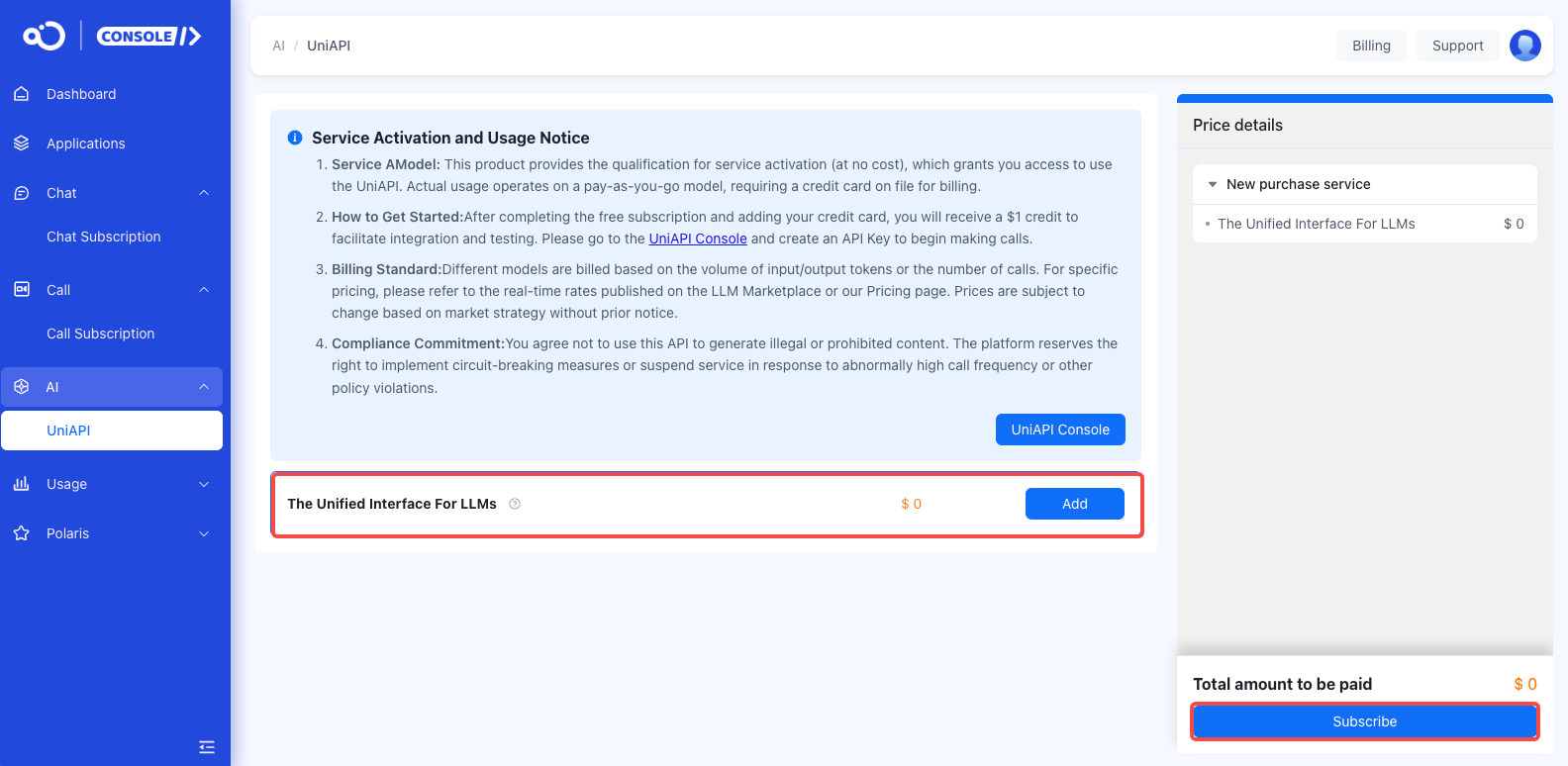
    On the AI > UniAPI page, purchase the large model service.
    image.png
    4.
    Add your credit card.
    5.
    Get your API Key from Nexconn LLM API Console.
    For detailed steps, please refer to: How to Get API Key

    Step 2: Choose a Model#

    Visit Model Plaza to browse 70+ available models and select one that suits your needs.
    Popular Recommendations:
    deepseek-v3.1 - Cost-effective with strong programming capabilities
    kimi - Ultra-long context, Chinese optimized

    Step 3: Make an API Call#

    Use the following code to quickly test:
    Python Example:
    cURL Example:

    🎯 Using the Console#

    Nexconn LLM Console provides visual management features:
    Usage Statistics: View Token consumption and costs in real-time
    Model Plaza: Browse all available AI models
    API Key Management: Create, edit, delete API Keys
    Quota Configuration: Set daily/monthly spending limits to avoid overspending
    Visit the console: https://console-xmodel.nexconn.ai

    💡 Best Practices#

    1. API Key Security#

    ❌ Do not hardcode Keys in your code
    ❌ Do not upload to public Git repositories
    ✅ Use environment variables for storage
    ✅ Use different Keys for different projects
    ✅ Rotate keys regularly

    2. Cost Control#

    Set daily/monthly limits for each Key
    Enable balance alert functionality
    Choose appropriate models based on task complexity
    Use Model Plaza to compare prices of different models

    3. Performance Optimization#

    Use streaming output for faster responses
    Control context length to avoid unnecessary Token consumption
    Use lightweight models for simple tasks
    Implement request retry mechanisms

    🆘 Get Help#

    Encountered a problem? We're here to support you:
    🎫 Ticket System

    Next Steps#

    🔍 Explore Model Plaza
    📊 View Usage Statistics
    🔑 Manage API Keys
    Modified at 2026-05-06 02:31:56
    Previous
    Nexconn LLM API Service
    Next
    Key Concepts and Terminology
    Built with